Seedance 2.0 / 2.5
ByteDance's one-take video model: up to 30 seconds with sound, dialogue and up to 50 references — the closest thing to a director that listens.
Whisperer's verdict: 4.3 / 5
What it nails
- Longest single-generation duration
- Cheap API pricing
Watch out for
- The newer 2.5 tier is still rolling out broadly
At a glance: Seedance. The live spec card, price calculator and Generate button show here on the site.
What Seedance actually is
Seedance is ByteDance's video model — the same family that powers CapCut's and Dreamina's video features. Version 2.0 introduced something most models still do not have: it writes the picture and the sound in one pass. Footsteps land on the frame where the foot lands, a line of dialogue moves the right mouth, rain has a sound. Version 2.5 kept that engine and pushed the length to 30 seconds in a single take, raised the reference budget to 50 files, and added timestamp control so you can tell it what happens at second 4 and what happens at second 11.
The honest way to think about it: Seedance is a very literal cinematographer. Give it a shot list and it follows the list. Give it a mood board and it improvises — sometimes beautifully, often expensively. This guide teaches you to give it the list.
You do not need a ByteDance account, a Chinese phone number or a monthly plan. Seedance 2.0, 2.0 Fast and 2.5 all run inside the Lab's video studio and you pay per clip with credits that never expire.
2.0, 2.0 Fast or 2.5 — which one to pick
| Seedance 2.0 | Seedance 2.0 Fast | Seedance 2.5 | |
|---|---|---|---|
| Max length | 15 s | 15 s | 30 s |
| Max resolution | 4K | 720p | 1080p |
| References | 12 files | 12 files | 50 files |
| Speed | Normal | Fastest | Normal |
| 5 s · 720p in the Lab | 128 credits | 102 credits | 195 credits |
| Pick it when | You need 4K or the sharpest still frames | Drafting ideas, testing prompts | Long takes, dialogue scenes, many references |
Rule of thumb: draft on 2.0 Fast, finish on 2.5. A 5-second draft costs about a dollar; you will burn far less than one wasted 30-second render.
How Seedance reads a prompt
Seedance treats your text as a screenplay, in this order: who is in the frame, what they do, where the camera is and how it moves, what the light looks like, what we hear. Prompts that follow that order are followed almost line by line. Prompts that lead with adjectives ("epic, cinematic, stunning") get a generic result, because none of those words tell the model what to draw.
The five-line formula that works every time:
- Subject — one clear main subject, with two or three physical details.
- Action — one action per shot, described as a verb, not a mood.
- Camera — the shot size (close-up, medium, wide) and one move (dolly in, pan left, static).
- Light & look — the light source and the color feel (dawn window light, sodium street lamps, clean studio white).
- Sound — ambience first, then any dialogue in quotes.
A ceramic mug of black coffee on a wooden windowsill. Steam curls upward and drifts left. Static close-up, shallow depth of field. Soft morning window light, warm neutral color. Sound: quiet room tone, a distant kettle click.
One camera move per shot. "Dolly in while orbiting and tilting up" is three moves; Seedance will pick one and blur the rest.
Every setting in the studio, explained
Open Seedance in the video studio and you will see these controls. Here is what each one really changes.
- Model — 2.0, 2.0 Fast or 2.5 (see the table above).
- Resolution — 720p is the sweet spot for social; 1080p for client work; 4K (2.0 only) when you will crop or print frames. Resolution multiplies the price, so preview at 720p.
- Length — type the seconds (4–15, or 4–30 on 2.5) or switch on Auto to let the model end the shot when the action ends. Auto is billed as a 10-second clip, so only use it when the story needs it.
- Aspect ratio — 16:9, 9:16, 1:1, 4:3, 3:4, 21:9 or Auto. If you attach a reference video the output adapts to that video.
- Create tab → Reference images / videos / audio — the files Seedance should look at. Images lock a face, a product or a location. Video clips lock motion or camera style (up to 15 seconds combined). Audio clips (up to 3) lock a voice or a music bed.
- Edit tab → References — change an existing clip: swap a background, recolor a product, keep the actor.
- Edit tab → Extend (2.5) — continue a finished clip for more seconds without a cut.
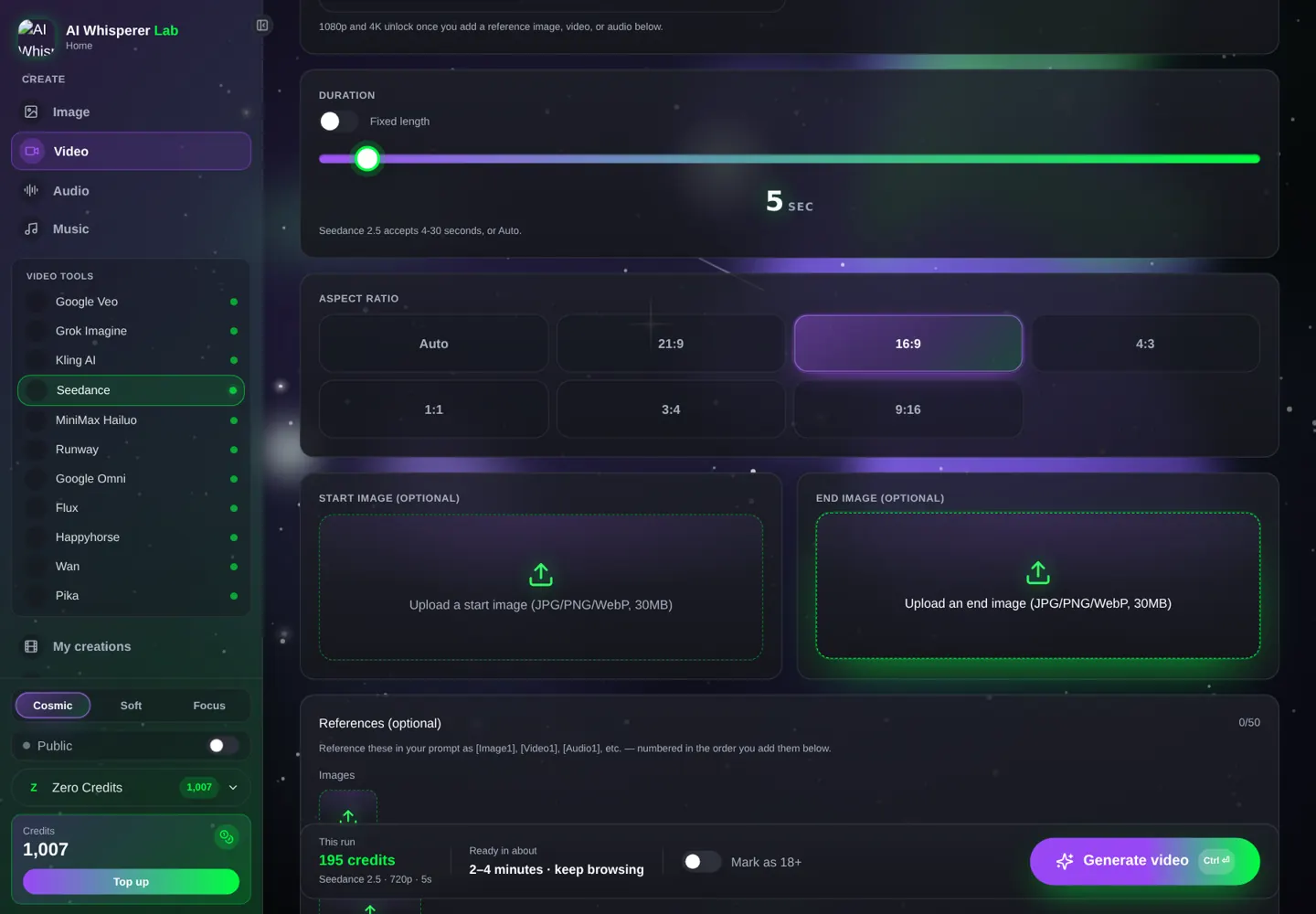
The price is shown next to the Generate button before you click. Change a setting and the number updates.
Your first Seedance clip in the Lab, step by step
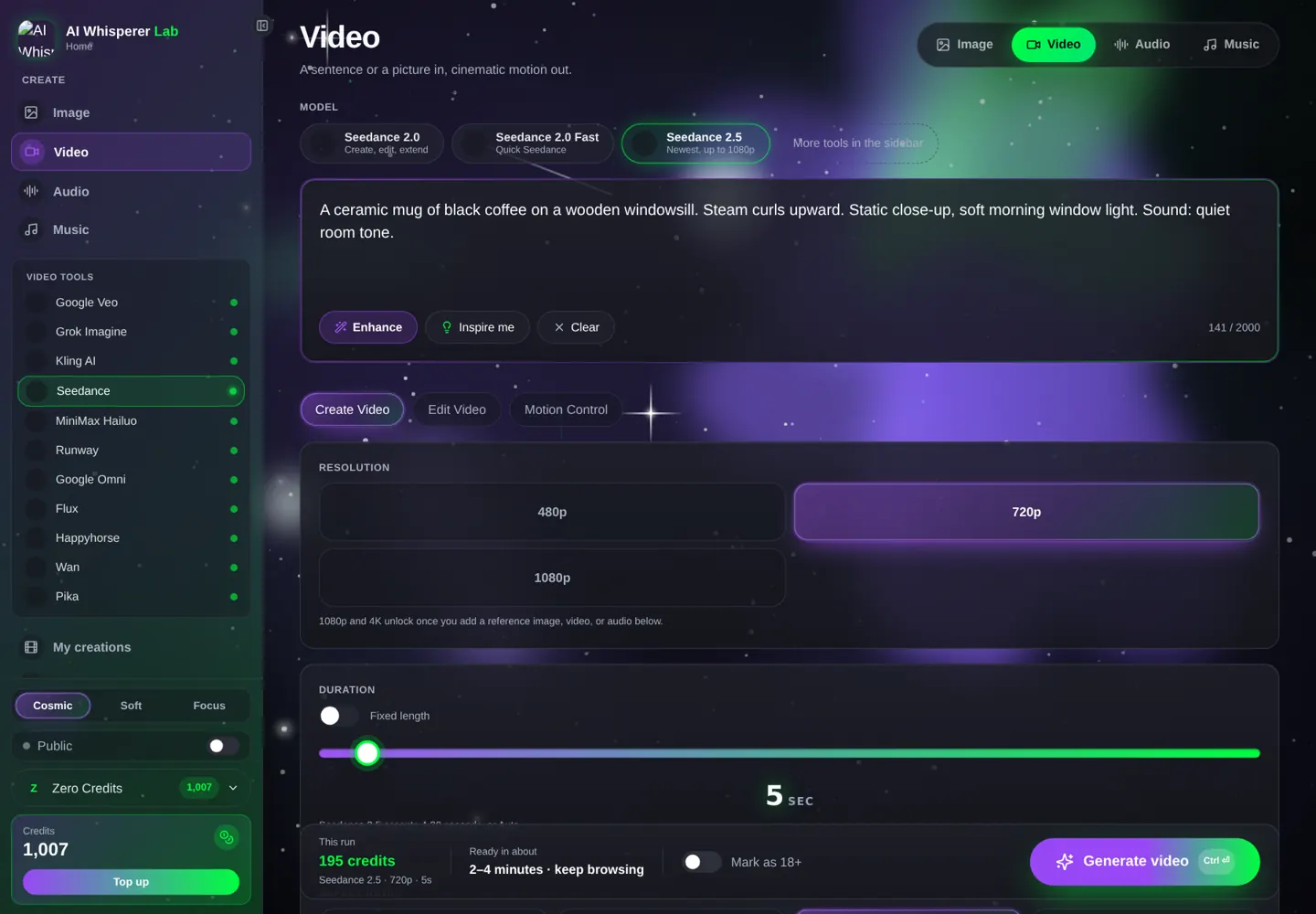
- Open the video studio and pick Seedance in the left sidebar, then 2.0 Fast.
- Set 720p, 5 seconds, 16:9.
- Paste the prompt below. Check the credit price under the button (about 102 credits).
- Press Generate. The clip cooks in the background — browse, it will appear in your gallery when done.
- Happy with the motion? Switch to 2.5, raise to 1080p and 10 seconds, generate the final.
Slow dolly-in on a matte black wireless earbud case on wet slate, dawn light from the left, soft rain in the air, subtle reflections on the stone. Sound: gentle rain, no music.
12 prompts you can run right now
Every box opens the studio with Seedance selected and the text already in place. Edit the nouns, keep the structure.
Product & e-commerce
Top-down shot of a glass bottle of amber perfume on white marble. A single rose petal lands beside it. Camera holds static, then a slow 20-degree orbit begins. Bright soft studio light, faint golden reflections. Sound: soft piano note, silk rustle.
A pair of white running shoes on a treadmill belt, belt starts moving, shoes stay centered as the camera tracks low and close. Cool gym LED light. Sound: belt hum, one sharp footstep rhythm.
Talking scenes (Seedance writes the lips and the voice)
Medium shot of a woman in her thirties, short black hair, olive linen shirt, in a bright kitchen. She looks at the camera, smiles, and says: "Three ingredients. Ten minutes. Let me show you." Handheld with a slight sway. Sound: kitchen room tone, a pan sizzling faintly.
Two friends at a diner booth at night, neon sign outside the window. Close-up on the man, mid-forties, grey beard: "You really quit?" Cut to the woman, red jacket, stirring her coffee: "Yesterday." She looks up and grins. Sound: diner ambience, cutlery, a distant jukebox.
Cinematic & storytelling
0–5s: Wide shot, a lone hiker on a ridge at sunrise, wind moving her jacket, camera slowly pushes in. 5–10s: Cut to close-up of her face, she exhales, breath visible, eyes on the valley. Golden low sun, long shadows. Sound: wind, then silence on the close-up.
Handheld tracking shot following a courier on a bicycle through a rain-slick Tokyo alley, neon signs smearing past, puddles splashing. Night, sodium and pink neon light. Sound: tires on wet asphalt, distant traffic, rain.
Extreme close-up of a vinyl record. The tonearm lowers, the needle touches the groove, the label starts spinning. Warm lamp light from the right. Static camera. Sound: needle crackle, then the first bar of a slow jazz drum.
Social & short-form (9:16)
Vertical 9:16. A barista pours latte art into a wide cup, the rosette forms in one continuous pour. Overhead camera, slight push-in. Warm café light. Sound: milk pour, soft café chatter.
Vertical 9:16. A young man in a hoodie unboxes a small black gadget on a wooden desk, lifts it to the camera and nods. Ring-light look, clean and bright. Sound: cardboard tear, a satisfying click.
Draft-mode prompts (2.0 Fast, cheap tests)
A golden retriever runs toward the camera on a beach at low tide, water spraying. Low camera, static. Overcast soft light. Sound: waves, paws on wet sand.
A paper airplane glides across a sunlit classroom, camera follows it in a slow pan, dust in the light beams. Sound: quiet room, one soft landing.
A city street at dawn in one unbroken 20-second take: the camera glides forward at walking pace as shop shutters open one by one, a street cleaner passes, sunlight reaches the pavement. Sound: shutters, distant birds, a broom.
References: how to lock a face, a product or a place
References are the reason to use Seedance over cheaper models. Attach an image and describe it in the prompt as the woman in the reference, the bottle from the reference image, the room in the location reference. Seedance keeps that thing identical while it animates everything else.
- One face, many shots — attach 2–3 photos of the same person (front, three-quarter, smiling). Reuse them across every clip of a series.
- Products — one clean packshot on a plain background beats five lifestyle photos.
- Motion from a clip — attach a short video of a hand gesture or a camera move and write "match the motion of the reference video".
- A voice — attach a clean 5–10 second recording and write "the speaker uses the voice from the reference audio".
Do not upload other people's faces, logos or copyrighted clips as references. The Lab's creator agreement applies, and so does the law.
Combos: Seedance is stronger with a partner
The best Seedance videos in the Lab rarely start in Seedance. They start with a perfect still frame.
Nano Banana Pro → Seedance (the product-ad workflow)
1. Generate the hero frame in the image studio — you get exact framing, exact product, exact light for a few credits.
Studio product photo of a matte black wireless earbud case on wet dark slate, dawn light from the left, soft reflections, 16:9, photorealistic, no text.
2. Download it, open Seedance, attach it as a reference image, and animate:
Use the reference image as the first frame. Slow dolly-in, a few raindrops hit the slate, the case lid opens a centimeter. Sound: soft rain, a tiny mechanical click.
Seedance → ElevenLabs (clean voice-over on top)
Seedance makes great ambient sound and decent dialogue. For a polished narrator, generate the clip silent-ish ("Sound: room tone only") and add a studio voice-over from the audio studio.
Three ingredients. Ten minutes. Dinner that looks like you tried. Let me show you.
Seedance 2.5 Extend → 60-second pieces
Generate 30 seconds, open the Edit tab → Extend, describe the next beat ("the camera keeps gliding, the sun clears the rooftops"), and extend. Two extends give you a minute without a visible cut.
Mistakes that waste credits
- Adjective soup. "Epic cinematic 8K masterpiece" adds nothing. Replace every adjective with a noun the camera can see.
- Three actions in five seconds. She walks in, sits down, opens the laptop and answers the phone — pick one.
- No sound line. If you do not describe audio, you get generic music. Write "Sound: room tone only" when you want quiet.
- Final render first. A 30-second 1080p clip on 2.5 is roughly 2,900 credits. Test the idea at 5 seconds 720p on 2.0 Fast first.
- Wrong ratio for the platform. Set 9:16 before you generate; cropping a 16:9 later throws away the frame you paid for.
- Text in the shot. Seedance can render short words but not paragraphs. Keep on-screen text to a logo or a two-word title, or add it in an editor.
What it costs, what it takes
| Model · settings | Credits | About | Typical wait |
|---|---|---|---|
| 2.0 Fast · 720p · 5 s | 102 | $1.02 | 1–2 min |
| 2.0 · 720p · 5 s | 128 | $1.28 | 2–3 min |
| 2.5 · 720p · 5 s | 195 | $1.95 | 2–4 min |
| 2.5 · 1080p · 10 s | 959 | $9.59 | 4–6 min |
| 2.0 · 4K · 5 s | 654 | $6.54 | 4–6 min |
Prices are what the studio shows today; the exact number is always printed under the Generate button before you spend anything. Credits never expire and there is no monthly fee — compare that with the $30–$100 a month a seat on a video platform costs whether you generate or not.
FAQ
Does Seedance generate sound and dialogue?
Yes. Audio is produced together with the picture: ambience, effects and spoken lines in quotes, lip-synced. It is one of the few models that does this natively.
How long can a Seedance video be?
Seedance 2.5 makes up to 30 seconds in one continuous shot; 2.0 and 2.0 Fast make up to 15. With Extend on 2.5 you can keep going in 30-second steps.
Is Seedance 2.5 better than 2.0?
For long takes, dialogue and reference-heavy scenes, yes. Seedance 2.0 still wins when you need 4K output. 2.0 Fast is the cheapest way to test a prompt.
Can I use my own photo or product as a reference?
Yes — attach it as a reference image and call it "the reference" in the prompt. Up to 12 files on 2.0, up to 50 on 2.5.
Do I need a subscription to use Seedance?
Not in the Lab. You buy credits once, they never expire, and each clip shows its exact price before you generate.
Why does my clip ignore part of the prompt?
Almost always too many actions or camera moves in one shot. Split the beats with timestamps (0–5s, 5–10s) or into two clips.
What aspect ratios does Seedance support?
16:9, 9:16, 1:1, 4:3, 3:4, 21:9, or Auto. Set it before generating.
Related tools
Kling 3.0 for multi-shot storyboards with dialogue in five languages · Google Veo 3.1 for the most natural physics in 8-second shots · Wan 3.0 for cheap 30-second takes · Nano Banana Pro for the still frames you animate. All of them live in the same studio, one wallet.