Google Veo 3.1
Google DeepMind's flagship video model: 4–8 second shots with the most believable physics, native dialogue and sound, frame-to-frame and ingredient references, up to 4K.
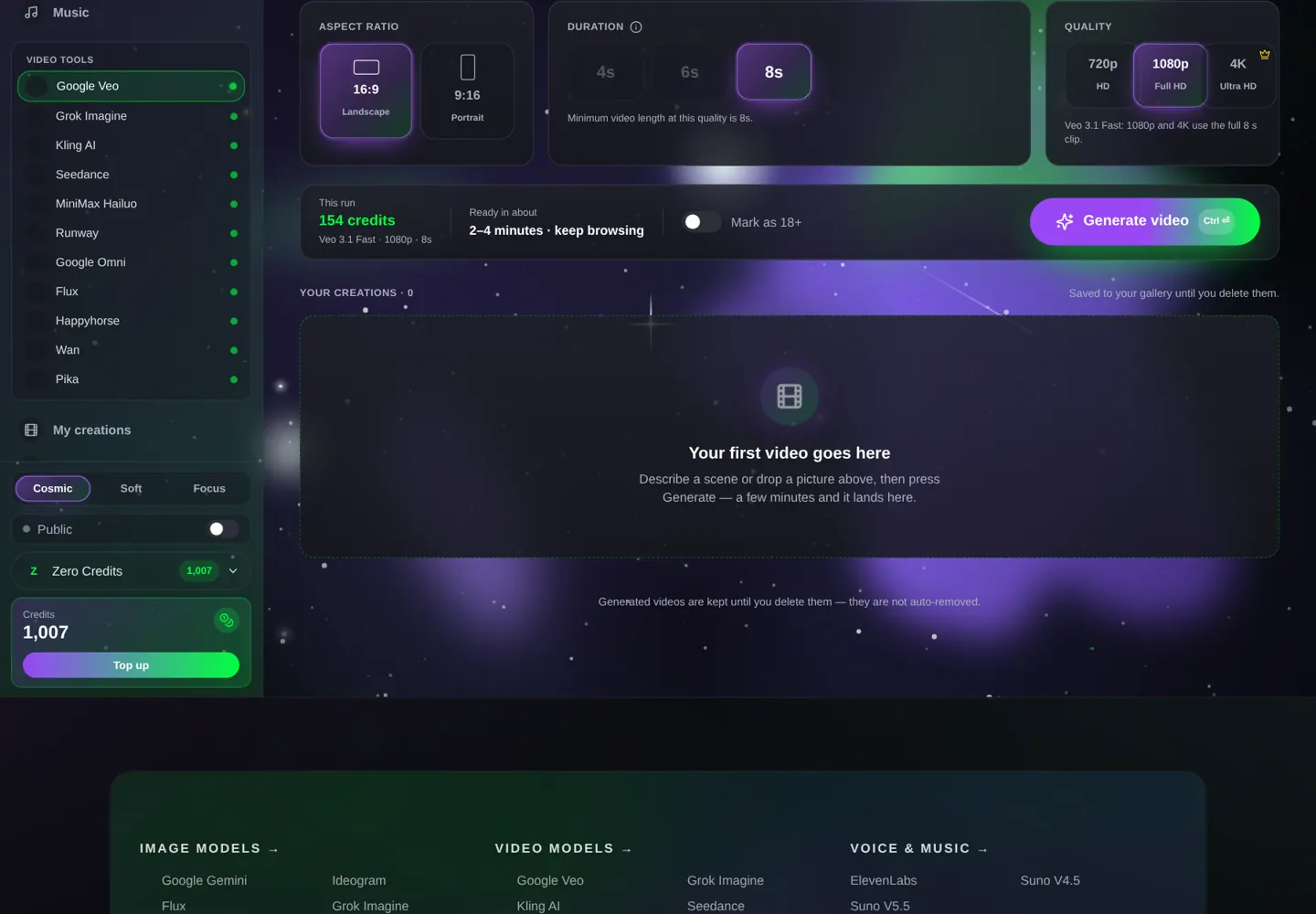
At a glance: Google Veo. The live spec card, price calculator and Generate button show here on the site.
What Veo 3.1 is
Veo is Google DeepMind's video model, the one behind the clips that made people say "wait, that's AI?" in 2025. Version 3.1 kept the realism — skin, fabric, water, weight — and added the two things creators asked for: Ingredients to Video (give it up to three reference images and it keeps that person, product or place consistent) and Frames to Video (give it a first and a last frame and it builds the motion in between, sound included).
Google sells Veo through Gemini's paid tiers and Flow, with monthly credit caps. In the Lab you get Veo 3.1, Veo 3.1 Fast and Veo 3.1 Lite in the video studio with per-clip pricing — an 8-second Fast clip at 1080p is 154 credits, about a dollar and a half.
Veo 3.1, Fast or Lite — which one
| Veo 3.1 | Veo 3.1 Fast | Veo 3.1 Lite | |
|---|---|---|---|
| Quality | Best | Close to best, quicker | Good for drafts and simple scenes |
| Max resolution | 4K | 4K | 1080p |
| Modes | Frames + Ingredients | Frames + Ingredients | Frames |
| 8 s · 1080p | 513 credits | 154 credits | 65 credits |
| Pick it when | Final client work, 4K | Almost everything | Testing prompts, storyboards |
Most people should live on Fast. The premium model earns its price on faces in extreme close-up and on 4K deliverables — not on a 9:16 social post.
Google's own prompt formula (and why it works)
Google's prompting guide gives one line to remember: [Cinematography] + [Subject] + [Action] + [Context] + [Style & ambiance]. Veo is trained on described footage, so it reacts to film vocabulary: dolly, crane, tracking, POV, shallow depth of field, 35 mm, golden hour, overcast, fluorescent. Sound has its own syntax:
- Dialogue in quotes: He says, "We have to leave now."
- SFX: thunder cracks in the distance
- Ambient noise: the hum of a starship bridge
- Negatives written as description, not a list: "a desolate landscape with no buildings or roads"
- Timestamps for multi-shot: [00:00-00:03] wide shot … [00:03-00:08] close-up …
Medium shot, a tired corporate worker rubbing his temples in exhaustion, in front of a bulky 1980s computer in a cluttered office late at night. Harsh fluorescent overhead light and the green glow of the monochrome monitor. Retro aesthetic, shot as if on 1980s color film, slightly grainy. Ambient noise: the buzz of the lights, a distant printer.
Veo makes 8 seconds at most. Plan one beat per clip and cut them together; a prompt that needs 20 seconds of story will be compressed into a blur.
Every setting in the studio, explained
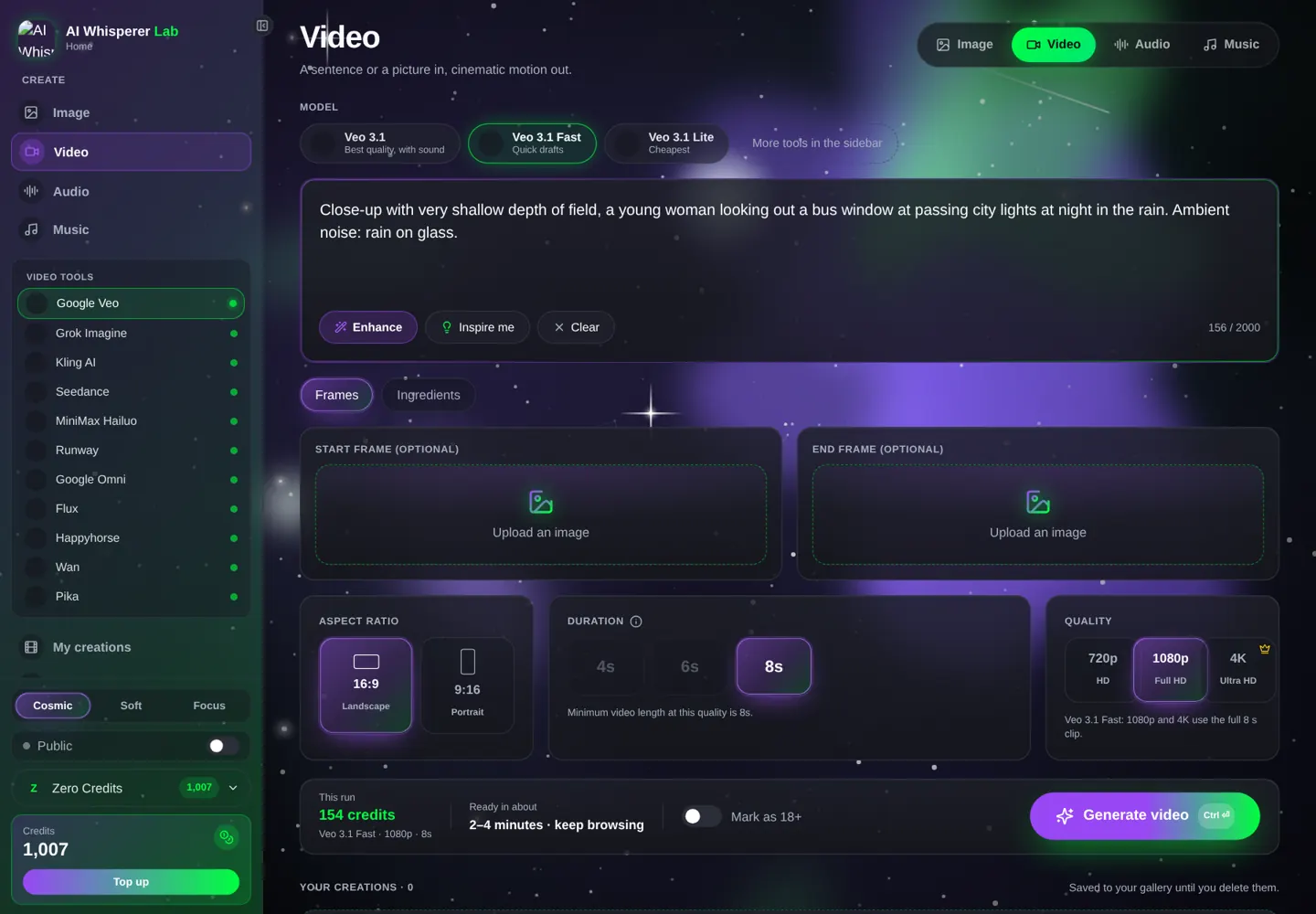
- Model — Veo 3.1 / Fast / Lite.
- Quality — 720p, 1080p, 4K. Anything above 720p locks the length to 8 seconds.
- Length — 4, 6 or 8 seconds (720p only for 4 and 6).
- Frames mode — upload a Start image (the first frame) and optionally an End image. One image = animate this photo. Two images = travel from A to B.
- Ingredients mode — up to three reference images: a person, an object, a place. Veo composes a new shot that contains them, with sound. Always 8 seconds.
- Prompt — describe the shot; in Ingredients mode, mention the references ("the woman from the first image").
Your first Veo clip, step by step
- Open the video studio, pick Google Veo, then Veo 3.1 Fast.
- Quality 720p, Length 6 seconds, no images.
- Paste the prompt below — price shows under the button.
- Generate. Watch how the light and the fabric behave; that is the Veo signature.
- For the final: 1080p, 8 seconds.
Close-up with very shallow depth of field, a young woman's face looking out a bus window at passing city lights, her reflection faint on the glass, inside a bus at night in a rainstorm. Melancholic mood, cool blue tones, cinematic. Ambient noise: rain on glass, the bus engine.
12 prompts you can run right now
People and dialogue
Medium shot of a detective behind his desk in a 1940s office, venetian-blind shadows. He looks up at a woman entering and says in a weary voice: "Of all the offices in this town, you had to walk into mine." SFX: a ceiling fan clicking. Film noir, high contrast.
A smooth 180-degree arc shot starting on the front of a singer on a small stage and circling behind her to a POV of the crowd. She sings: "When you look me in the eyes, I can see a million stars." Warm stage light, haze. Ambient noise: a small crowd, reverb.
Two-shot, a father and a young daughter on a porch swing at dusk. She asks: "Do stars get tired?" He laughs softly: "Only the ones that stay up too late." Golden hour, gentle push-in. Ambient noise: crickets, the swing chain.
Camera and world
Crane shot starting low on a lone hiker and rising high above, revealing she stands on the edge of a colossal mist-filled canyon at sunrise. Epic, awe-inspiring, soft morning light. SFX: wind, a distant hawk.
POV shot, walking slowly through a busy Marrakech market at midday, hands brushing past hanging lanterns, vendors calling out. Bright hard sun, dust in the air. Ambient noise: crowd, brass, a scooter passing.
Aerial tracking shot following a red convertible along a coastal cliff road, waves crashing below, late afternoon. 35 mm film look, warm. SFX: engine, wind, surf.
Products
Extreme close-up, macro lens: a drop of espresso falls into a white cup, crema rippling, in slow motion. Soft window light. SFX: the single drop, then silence.
A matte black smartwatch on a wet stone in a rainforest, rain drops beading on the glass, slow dolly-in, dappled green light. No people, no text. Ambient noise: rain, birds.
Vertical 9:16. A skincare bottle stands on a marble ledge; a hand enters, presses the pump, a pearl of cream lands on a fingertip. Bright, clean, high key. SFX: the pump click.
Multi-shot with timestamps
[00:00-00:03] Wide shot: an explorer with a headlamp steps into a vine-covered jungle temple, dust in the beam. [00:03-00:06] Close-up: her gloved hand wipes moss from a carved stone face. [00:06-00:08] She looks up, eyes widening. SFX: dripping water, her breath, a low rumble.
Drafts on Lite
A golden retriever puppy runs across a sunny lawn toward the camera, ears flapping, slow motion. Low static camera. Ambient noise: birds, a laugh off-camera.
Time-lapse feel: clouds racing over a wheat field, a farmhouse in the distance, the light going from noon to sunset. Static wide shot. Ambient noise: wind through wheat.
Frames and Ingredients: consistency without luck
Frames is the fix for "it looks nothing like my photo". Upload the actual photo as the start frame and Veo animates that image. Add an end frame and you control where the shot lands — great for product turns and before/after reveals.
Ingredients is the fix for "same person, different shot". Give Veo three images — the person, the outfit or object, the location — and describe a new scene. It keeps the identity and invents the camera.
Nano Banana Pro → Veo Frames (perfect first frame)
Make the exact frame in the image studio, then animate it in Frames mode.
Photorealistic portrait, a woman in her thirties in a mustard raincoat under a glass bus shelter at night, rain, neon reflections, 16:9, shallow depth of field.
Animate the start frame: she turns her head toward the camera and smiles slightly, rain keeps falling, a bus passes behind her out of focus. Ambient noise: rain, the bus hiss.
Veo Ingredients → a mini series
Generate one clean portrait and one product shot in the image studio, load both as Ingredients, then write five different scenes. Same face, same product, five ads.
Mistakes that waste credits
- Asking for 15 seconds. Veo stops at 8. Split the story.
- Premium for drafts. Fast is a third of the price and 90% of the quality.
- No sound line. Without it you get a generic score. Write the ambience you want, or "no music".
- Lists of negatives. "No blur, no text, no hands" works badly. Describe the clean scene instead.
- Reference photos with different lighting. Ingredients blend better when the three images share a look.
What it costs, what it takes
| Model · settings | Credits | About | Typical wait |
|---|---|---|---|
| Lite · 1080p · 8 s | 65 | $0.65 | 1–3 min |
| Fast · 720p · 6 s | 90 | $0.90 | 2–3 min |
| Fast · 1080p · 8 s | 154 | $1.54 | 2–4 min |
| Veo 3.1 · 1080p · 8 s | 513 | $5.13 | 3–6 min |
| Veo 3.1 · 4K · 8 s | 768 | $7.68 | 5–8 min |
Compare: a Google AI Pro plan is about $20 a month with capped Veo generations that reset; the Lab charges per clip and your credits never expire.
FAQ
How long can a Veo 3.1 video be?
4, 6 or 8 seconds. Above 720p, and in Ingredients mode, it is always 8 seconds.
Does Veo 3.1 make sound and dialogue?
Yes — ambience, effects and lip-synced lines in quotes, generated with the video.
Can I animate my own photo?
Yes. Use Frames mode: upload the photo as the start frame and describe the motion.
What are Ingredients?
Up to three reference images (person, object, place) that Veo keeps consistent while composing a new shot.
Is Veo 3.1 available without a Google plan?
Yes, in the Lab, per clip, with credits that never expire.
Is there a watermark?
Google adds an invisible SynthID watermark to every Veo clip; nothing visible on the picture.
Related tools
Kling 3.0 for longer multi-shot dialogue · Seedance 2.5 for 30-second takes · Gemini Omni Flash for cheap edits of existing clips · Nano Banana Pro for start frames. All in the same studio.