Grok Imagine Video 1.5
xAI's fast video model: animate a still or a text idea into 1–15 seconds of video with dialogue, effects and music generated in the same pass.
Whisperer's verdict: 4.2 / 5
What it nails
- Cheapest among major players
- Fast
- Built-in sound
Watch out for
- Clips capped at 6-15 seconds per generation
At a glance: Grok Imagine. The live spec card, price calculator and Generate button show here on the site.
What Grok Imagine Video 1.5 is
Grok Imagine is xAI's media model family, the one built into Grok and X. Version 1.5 of the video model does one thing unusually well: it takes a still image and brings it to life without changing it — lighting, color and texture survive — and it writes sound at the same time: spoken lines with lip-sync, effects, ambience, even a music bed. It is quick, it is flexible on aspect ratio, and it handles "the presenter looks at the camera and says hello" better than models twice its price.
Its ceiling: 15 seconds, and it prefers one action at a time. Complex choreography belongs to Runway; long takes to Seedance. For a fast, sounding, social-ready clip, Grok is a very good default.
On X you need a Premium subscription and a phone app. In the Lab, Grok Imagine Video 1.5 sits in the video studio next to Kling and Veo, 113 credits for a 5-second clip, no plan.
How Grok reads a prompt
Keep it short and concrete. The model listens for four things, in this order:
- Subject — "a presenter in a charcoal sweater".
- Motion — "she smiles and looks to camera".
- Camera — "medium shot, slow push-in". One move.
- Audio — "she says, \"Welcome\"; soft room tone". Always include it, or the clip may come back silent or with random music.
A presenter in a charcoal sweater in a bright studio. She smiles, looks to camera and says: "Welcome back — this one's short." Medium shot, slow push-in. Soft room tone, no music.
"Cinematic" tells Grok nothing. Name the shot size and the move instead.
Every setting in the studio, explained
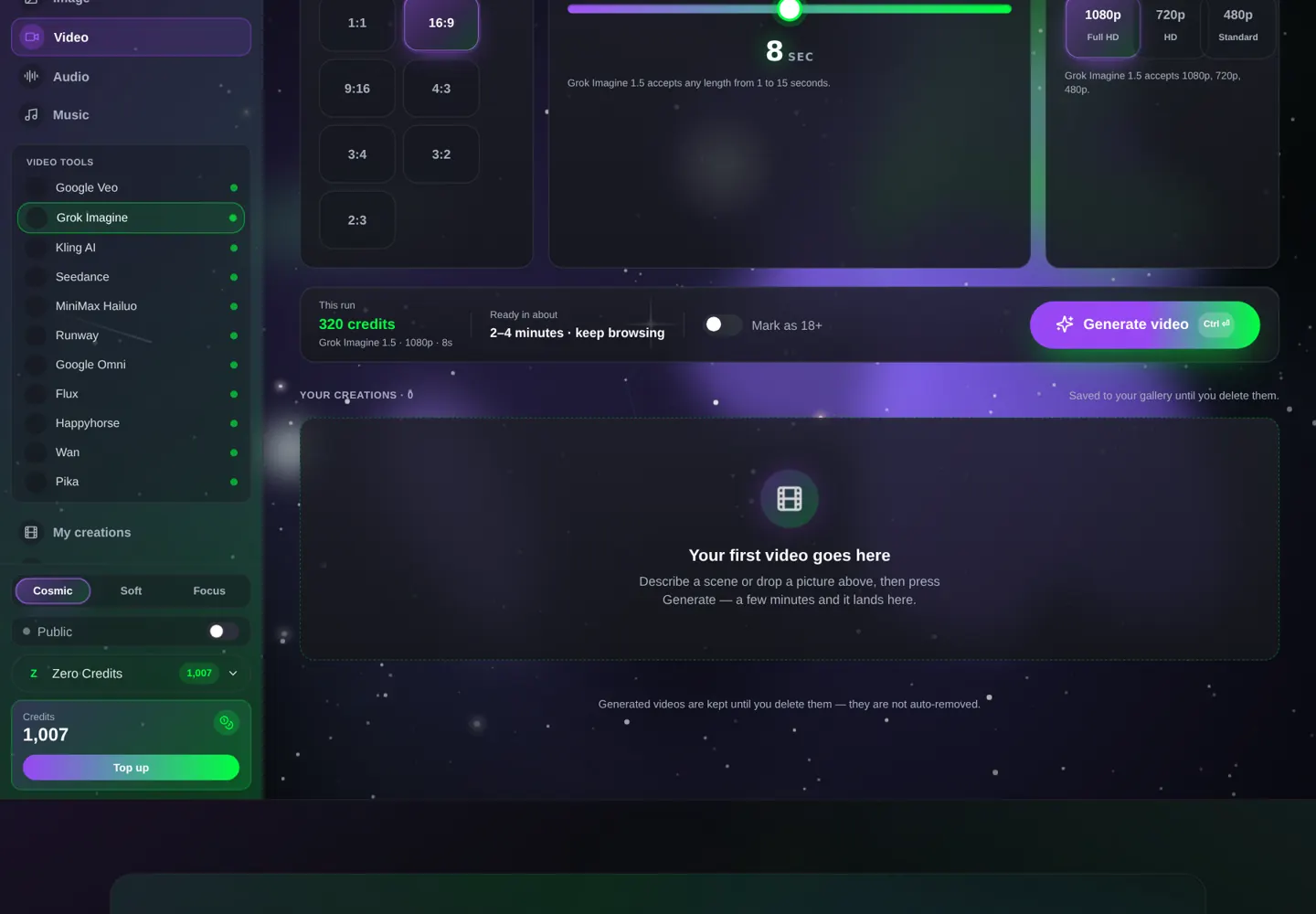
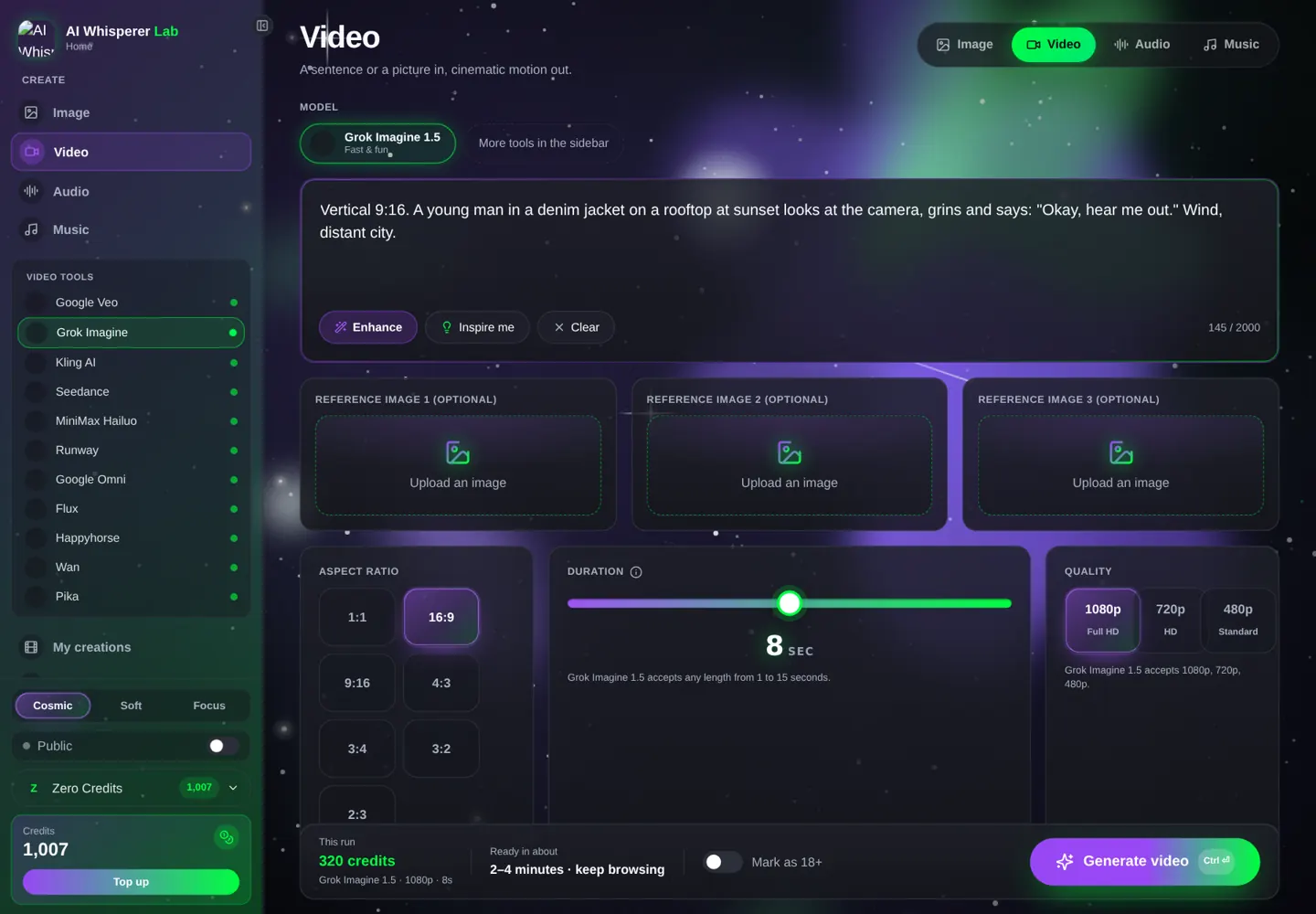
- Quality — Standard (480p) for tests, HD (720p) for social, Full HD (1080p) for delivery.
- Length — 1 to 15 seconds; the price scales per second.
- Aspect ratio — seven options; pick before generating.
- Ingredients → reference images (up to 3) — the face, product or style to keep. The first image is treated as the start frame if you describe it that way.
Your first Grok clip, step by step
- Open the video studio, pick Grok Imagine.
- HD (720p), 5 seconds, 9:16.
- Paste the prompt below (113 credits) and Generate.
- Then load a portrait as a reference image and run the same prompt — watch the face stay yours.
Vertical 9:16. A young man in a denim jacket on a rooftop at sunset looks at the camera, grins and says: "Okay, hear me out." Handheld, slight push-in. Wind, distant city.
12 prompts you can run right now
Talking clips
Close-up of a barista behind a counter, she holds up a cup and says: "Oat milk, extra shot — I remembered." Warm café light, static camera. Espresso machine hiss, soft chatter.
A teacher at a whiteboard, medium shot, points at a simple diagram and says: "Two rules. That's it." Bright classroom light, slow push-in. Marker squeak, room tone.
Two friends on a park bench, side by side, one turns and asks: "Did you actually book it?" the other nods and laughs. Late afternoon, static two-shot. Birds, a distant dog.
Products
A matte green water bottle on a hiking trail rock, morning light. The camera pushes in slowly as a hand picks it up and unscrews the cap. Wind, birds, a soft cap twist.
Vertical 9:16. A phone lies face-up on a desk; the screen lights up with a notification; a hand picks it up and the camera tilts up to a smiling face. Clean bright room. A short chime.
Top-down shot of a pizza being sliced on a wooden board, cheese stretching, steam rising. Static camera. Knife on wood, a satisfied 'mm' off-camera.
Mood and motion
A cat on a windowsill watching rain, tail flicking, reflections sliding across the glass. Static close-up, soft grey light. Rain, a purr.
Slow-motion feel: a runner crosses a finish line in a small-town race, arms up, confetti. Low tracking shot, bright noon. Crowd cheering, a whistle.
A vintage neon diner sign flickers on at dusk, the camera tilts down to the empty parking lot as one car pulls in. Buzzing neon, an engine, gravel.
Reference-driven (attach images first)
Use the first reference image as the character. She walks through a sunny farmers market, picks up an apple and smiles at the camera. Medium tracking shot. Market chatter, a soft crunch.
Use the reference product image. The bottle stands on a beach at golden hour; the camera orbits slowly; waves in the background. Surf, a light breeze.
Animate the reference image: the subject blinks, breathes, turns slightly toward the camera; nothing else changes. Static camera. Soft room tone.
Settings that change the result the most
Quality vs. price. 480p costs about a third of 1080p and is perfectly fine for judging motion and timing. Grok's motion does not get better at 1080p, only sharper — so every test belongs at 480p and only the final at 1080p.
Length. Grok bills per second and its best clips are short. A 5-second clip with one clean action and one line of dialogue beats a 15-second clip that tries to tell a story. If you want fifteen seconds, plan three beats of five and describe them with light timing ("first … then … finally"), or generate three clips and cut.
Aspect ratio before anything else. Grok composes for the frame you pick. A 9:16 vertical puts the subject centered and close; a 21:9 does not exist here, but 16:9 with a wide shot gives a cinematic feel. Change the ratio and the same prompt gives a different picture — choose it first, then write.
References. Up to three images. Grok uses them for identity and style, not as a locked first frame, unless you say "animate the reference image". That distinction matters: "use the reference as the character" gives you a new scene with the same face; "animate the reference" gives you that exact photo, moving.
Image-to-video: the workflow that sells
Grok's strength is preserving a still. Make the perfect frame in the image studio — Grok Imagine's own image model or Nano Banana Pro — and animate it here. For a series, keep the same reference photos and change only the scene.
Grok Imagine (image) → Grok Imagine Video
Portrait of a presenter in a charcoal sweater against a soft grey studio backdrop, three-point light, 85 mm look, 16:9, photorealistic.
Animate the reference: the presenter smiles, looks to camera and says: "Let's get into it." Medium shot, slow push-in. Soft room tone.
Nano Banana Pro → Grok (product series)
Studio packshot of a matte green water bottle on white, soft top light, 1:1, no text.
Use the reference product. Vertical 9:16, the bottle on a gym floor, a hand grabs it mid-workout. Gym ambience, a gulp.
Mistakes that waste credits
- No audio cue. Grok may return silence or random music. Always write the sound.
- Three actions. One per clip. Fifteen seconds is not a scene, it is a beat.
- Vague camera. "Beautiful shot" is not a camera. "Static close-up" is.
- 1080p tests. Draft at 480p (about a third of the price), finish at 1080p.
- Mismatched references. Three photos of one person in the same light beat ten random ones.
What it costs, what it takes
| Settings | Credits | About | Typical wait |
|---|---|---|---|
| 480p · 5 s | 64 | $0.64 | 1–2 min |
| 720p · 5 s | 113 | $1.13 | 1–2 min |
| 1080p · 5 s | 200 | $2.00 | 2–3 min |
| 1080p · 10 s | 400 | $4.00 | 2–4 min |
X Premium+ runs about $40 a month. The Lab charges per clip and your credits never expire.
FAQ
Does Grok Imagine Video generate sound?
Yes — dialogue with lip-sync, sound effects, ambience and music, in the same pass as the video.
How long can a Grok video be?
1 to 15 seconds. Longer pieces are made by chaining clips.
Can I use my own photo?
Yes, as a reference image. Grok is especially good at keeping the photo's lighting and texture.
What aspect ratios are supported?
16:9, 9:16, 1:1, 4:3, 3:4, 3:2 and 2:3.
Do I need X Premium?
Not in the Lab. You pay per clip with credits that never expire.
Why did my clip come out silent?
The prompt had no audio line. Add one: "soft room tone, no music" or the line the person says.
Related tools
Kling 3.0 for multi-shot dialogue · Veo 3.1 for maximum realism · Grok Imagine 1.5 (image) and Nano Banana Pro for the stills. Same studio, one wallet.