Kling 3.0
Kuaishou's cinema-grade video model: native 4K, 3–15 second clips, multi-shot scenes with dialogue and lip-sync in five languages, plus Omni references and Motion Control.
Whisperer's verdict: 4.4 / 5
What it nails
- Best value at 4K
- Strong physics simulation
- Generous free tier
Watch out for
- Slower renders at top quality
At a glance: Kling. The live spec card, price calculator and Generate button show here on the site.
What Kling 3.0 is — and why creators keep coming back to it
Kling is built by Kuaishou, the company behind one of China's biggest short-video apps, and it shows: the model understands shots. Ask for a shot-reverse-shot conversation, a slow orbit, a hard cut to a close-up, and 3.0 does it inside one clip. It renders native 4K, writes the sound and the voices in the same pass, and its lip-sync handles five languages and a pile of accents (American, British, Indian English; several Chinese dialects).
Version 3.0 also brought three siblings. 3.0 Turbo trades a little polish for speed and a lower price. 3.0 Omni accepts references — images, a video clip, an existing video to edit — and keeps the subject identical across shots. 3.0 Motion Control copies the movement of a reference video onto your character. All four run in the Lab's video studio, no Kling subscription, no queue tiers, pay per clip.
Kling's own app sells 3.0 by monthly plan and 'credits per second' that reset. In the Lab a 5-second 720p clip is 68 credits, credits never expire, and the price is printed before you generate.
The four Kling 3.0 models side by side
| Kling 3.0 | 3.0 Turbo | 3.0 Omni | 3.0 Motion Control | |
|---|---|---|---|---|
| Input | Text, start + end frame | Text, start frame | Text, start/end, up to 3 images, 1 video | Reference video + your character |
| Native audio | Yes (switchable) | No | Yes / keep original / off | — |
| Max resolution | 4K | 1080p | 4K | 1080p |
| Length | 3–15 s | 3–15 s | 3–15 s | Follows the reference |
| 5 s · 720p | 68 credits | 113 credits | 68 credits | 101 credits |
| Use it for | Most work | Fast drafts, silent B-roll | Same face/product across shots, edits | Dance, gestures, motion copy |
How Kling reads a prompt
Kling wants a scene description, then a sequence of shots. It reads sentences in order and treats each camera instruction as a new shot. Dialogue goes in quotes, and you name who is speaking. The official Kling guide phrases it like a film script, and that is exactly how it should be written:
- Setting — where, what time, what light, one sentence.
- Characters — each with two visible details (age range, clothing, hair).
- Shot 1 · Shot 2 · Shot 3 — camera size + move, action, and who says what, in quotes.
- Sound — background music or ambience, and the accent/language if it matters.
Outdoor terrace of a seaside café at golden hour. A woman in a striped shirt sits across from a man in a white T-shirt. The camera zooms in on the woman as she swirls her juice and says: "These trees turn yellow in a month, don't they?" Close-up of the man, he looks down and says: "But they're green again next summer." Soft wind, distant waves.
Two speakers, two lines each, in 10 seconds — that is the comfortable limit. Four speakers or a monologue of 40 words will drift out of sync.
Every setting in the studio, explained
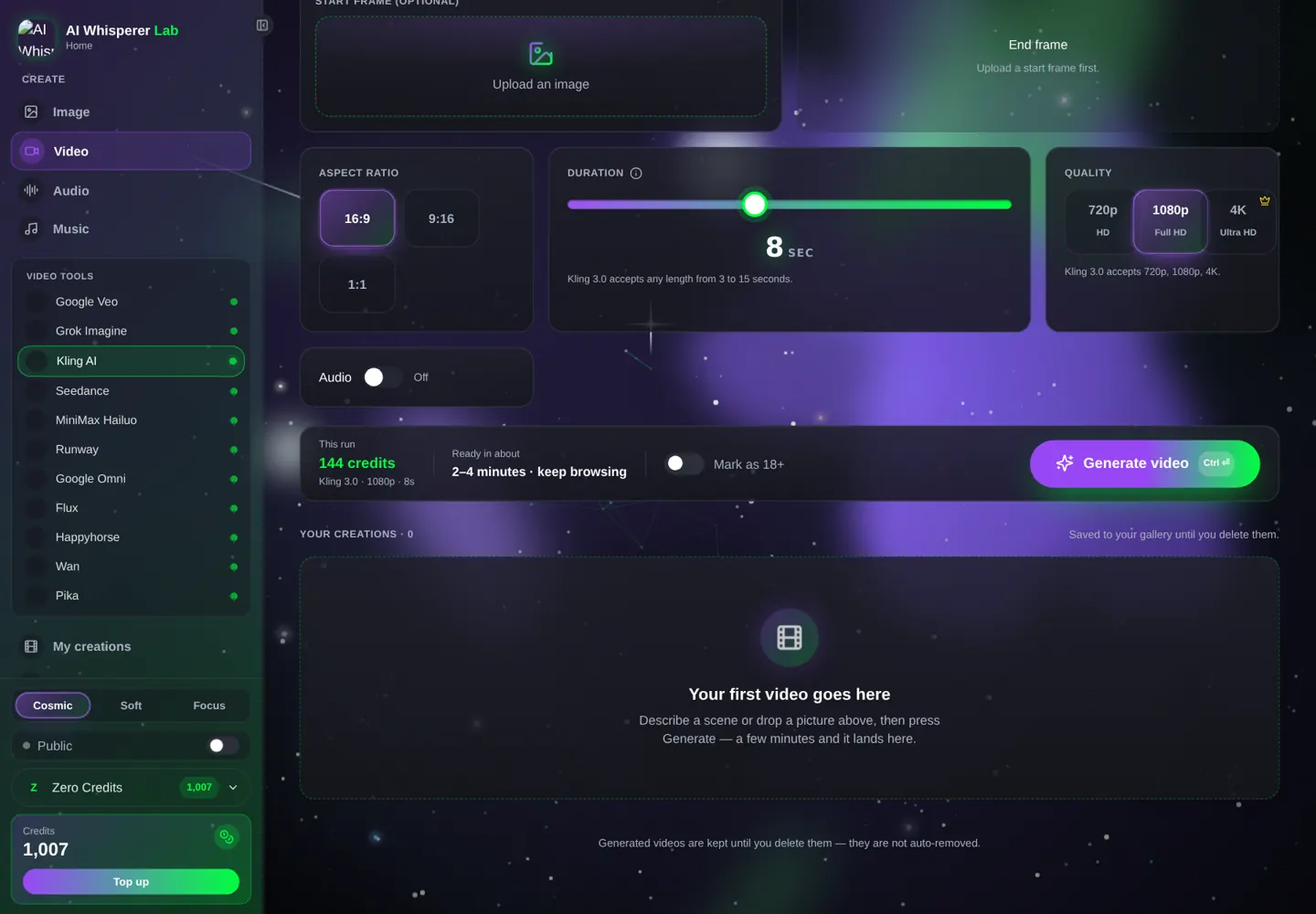
- Model — 3.0, 3.0 Turbo, 3.0 Omni or 3.0 Motion Control (table above). Older 2.5 Turbo and 2.6 are also there for cheap drafts.
- Quality — 720p / 1080p / 4K. 4K roughly quadruples the price; use it only for the final.
- Audio — Native (Kling writes sound and voices) or Off (silent, cheaper). Omni adds Original to keep the sound of the video you are editing.
- Length — 3 to 15 seconds. Dialogue needs about 3 seconds per short line.
- Aspect ratio — 16:9, 9:16, 1:1.
- Ingredients → Start frame / End frame — upload a first frame to animate a still; add an end frame to force where the shot lands.
- Omni → Reference images (up to 3) + reference video — the faces, products or places to keep identical. Omni Edit takes a base video and changes it by prompt.
- Motion Control — upload a video of the movement; Kling maps it onto your character image.
Your first Kling clip, step by step
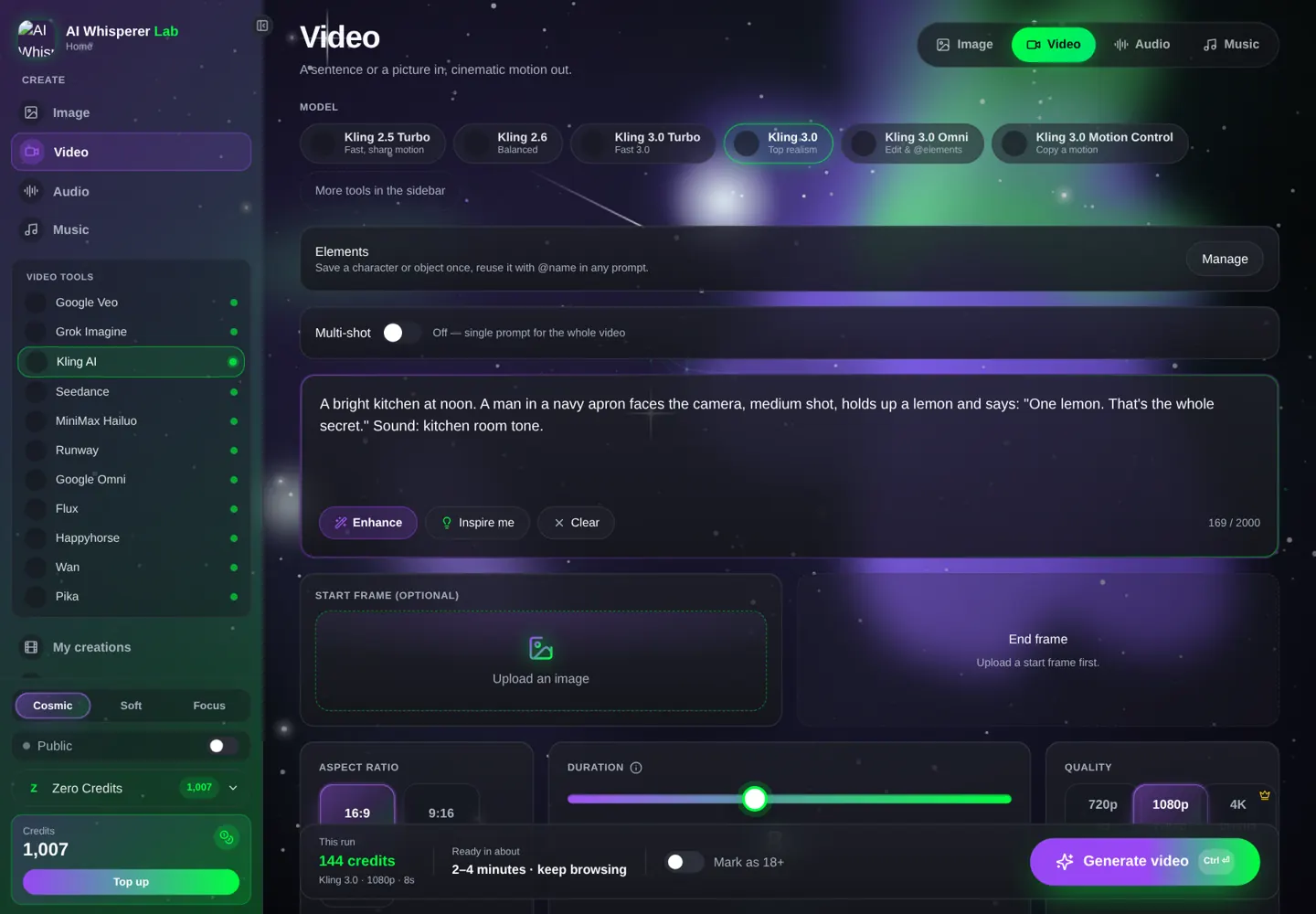
- Open the video studio, pick Kling AI in the sidebar, then Kling 3.0.
- Quality 720p, Audio Native, 5 seconds, 16:9.
- Paste the prompt below — the price shows under the button (68 credits).
- Generate. Check the lip-sync on the close-up; if the line is rushed, add 2 seconds and run again.
- For the final, switch to 1080p (135 credits at 5 s with audio).
A bright kitchen at noon. A man in his forties, salt-and-pepper beard, navy apron, faces the camera, medium shot, slight push-in. He holds up a lemon and says with a smile: "One lemon. That's the whole secret." Sound: kitchen room tone, a knife tap on the board.
13 prompts you can run right now
Talking heads and dialogue
Podcast studio, two microphones, warm tungsten light. Medium two-shot. The host, a woman with curly hair and a green sweater, turns to her guest and asks: "So what actually changed?" Cut to close-up of the guest, a man in glasses: "Everything. In one week." Sound: quiet studio, a faint chair creak.
A middle-aged man orders in a small restaurant, seated, waiter out of frame. He speaks English with an Indian accent: "I'd like the seafood pasta, and a filet mignon, medium rare." Then looks up: "And a drink recommendation?" Warm pendant light, static medium shot. Sound: cutlery, low chatter.
Rooftop of a high school at night, city lights behind. A girl leans on the railing. A boy walks over with two cans of soda and hands one over. Boy, casual, in Spanish: "¿Terminaste la tarea?" Girl, sighing, in Spanish: "El examen me da miedo." Soft wind, distant traffic.
Ads and products
Parisian apartment window, afternoon sun through shutters onto a faceted perfume bottle on a velvet pedestal. The camera pans in from scattered rose petals and racks focus onto the bottle, then a slow orbit. Female voice-over, slow, British accent: "Bathe in the golden hour." Soft French piano.
Studio white background. A pair of matte olive sneakers rotates slowly on a turntable, camera low and level, slow dolly-in to the stitching. Crisp soft light. Sound: a soft whoosh, then silence.
Vertical 9:16. A hand places a phone on a wireless charger on a wooden desk; the screen lights up with a soft glow; the camera tilts up to a smiling woman giving a thumbs up. Sound: a gentle chime.
Cinematic
Authentic office texture, one continuous take. The camera follows a woman in a beige coat in a medium shot, tracking as she walks out of the elevator, pausing when she pauses to hang her bag, then tracking again to her desk where she sits and sips tea. Natural window light. Sound: office ambience, footsteps.
Desert highway at dusk, a vintage motorcycle rider pulls over. Wide shot, then cut to close-up of the rider removing a helmet, hair blown by wind, orange sky. Sound: engine ticking as it cools, wind.
A 360-degree orbit around a chess player mid-thought in a dim library, dust in a shaft of light, fingers hovering over a knight. Sound: a clock ticking.
Omni references and edits
Use reference image 1 as the character and reference image 2 as the product. She holds the product up to the camera in a bright studio, medium shot, slow push-in, and says: "This is the one." Sound: studio room tone.
Edit the base video: replace the background with a snowy mountain pass at dawn, keep the person, their clothing and their movement exactly the same. Keep original audio.
Motion Control
Apply the dance movement from the reference video to the character in the image. Keep the character's face, outfit and the room. Smooth, natural motion, 720p.
Cheap silent B-roll: slow aerial glide over pine forest at dawn, mist between the trees, sunlight cutting through. No audio.
Start frame + end frame: the trick for controllable shots
When a text prompt keeps wandering, stop describing and start showing. Upload a start frame (where the shot begins) and an end frame (where it must arrive). Kling animates the path between them. This is how you get a product that turns exactly 90 degrees, a door that opens fully, or a character who ends looking at the camera. Make both frames in the image studio first — same lighting, same lens — and Kling has nothing to guess.
Kling Image 3.0 → Kling 3.0 (frame-to-frame)
Generate the start frame and the end frame in the image studio, then load them as Start and End.
Studio photo, a matte olive sneaker on a white turntable, 3/4 view from the left, soft top light, 16:9.
Studio photo, the same matte olive sneaker on a white turntable, 3/4 view from the right, soft top light, 16:9.
The sneaker rotates smoothly from the start frame to the end frame on the turntable. Camera static. Sound: soft whoosh.
Kling → ElevenLabs (studio narration)
Kling voices are good; a dedicated narrator is better for ads. Generate the clip with Audio Off, then make the voice-over in the audio studio.
This is the one. Two years of work, one lemon, and a kitchen that finally smells like home.
Mistakes that waste credits
- Dialogue without a speaker. Write the man says, not just the quote, or the wrong mouth moves.
- 4K drafts. Frame the shot at 720p; 4K costs about 6× more.
- Five shots in five seconds. Give every shot at least 3 seconds. 15 seconds fits three or four shots.
- Reference photos that disagree. Omni references should share the same person, same hair, same era of photo.
- Expecting text on screen. Kling keeps text that is in your start frame; it invents gibberish for text you only describe.
What it costs, what it takes
| Model · settings | Credits | About | Typical wait |
|---|---|---|---|
| 3.0 · 720p · 5 s · audio | 68 | $0.68 | 2–4 min |
| 3.0 · 1080p · 5 s · audio | 135 | $1.35 | 3–5 min |
| 3.0 · 1080p · 10 s · audio | 269 | $2.69 | 4–7 min |
| 3.0 Turbo · 720p · 5 s | 113 | $1.13 | 1–2 min |
| Motion Control · 720p · 5 s | 101 | $1.01 | 3–5 min |
Exact prices are always shown under the Generate button. No plan, no reset date, no wasted seconds.
FAQ
Does Kling 3.0 generate voices and lip-sync?
Yes, natively. Put the line in quotes, name the speaker, and optionally the language or accent. Supported: English, Chinese, Japanese, Korean, Spanish.
How long can a Kling 3.0 video be?
3 to 15 seconds per generation. Chain clips with a shared start/end frame for longer pieces.
What is the difference between Kling 3.0 and Omni?
Omni adds references — up to three images and a video — so a face or product stays identical across shots, and it can edit an existing video by prompt.
Can Kling do 4K?
Yes, 3.0 and 3.0 Omni render native 4K. Draft at 720p first; 4K costs several times more.
Do I need a Kling subscription?
No. Kling 3.0 runs in the Lab per clip with credits that never expire.
Why does my character change between shots?
Text alone does not lock identity. Use a start frame, or Omni with 2–3 reference photos of the same person.
Related tools
Seedance 2.5 for 30-second single takes · Google Veo 3.1 for the best realism at 8 seconds · Runway Gen-4.5 for precise camera choreography · Kling Image 3.0 for start and end frames. Same studio, one wallet.